Desktop Apps vs Web Apps: Understanding the Key Differences
Deciding between desktop apps vs web apps: understanding the key differences is a fundamental step for anyone choosing software for their business or personal productivity. While both provide powerful tools for task management, design, and data processing, they operate on entirely different technical foundations. Desktop applications run locally on your computer’s hardware, whereas web apps live on remote servers and are accessed through your internet browser.
Recognizing how these two categories handle data, updates, and offline access will help you choose the right path for your specific workflow. This article breaks down those technical nuances to help you make an informed decision for your digital environment.
Core Technical Differences
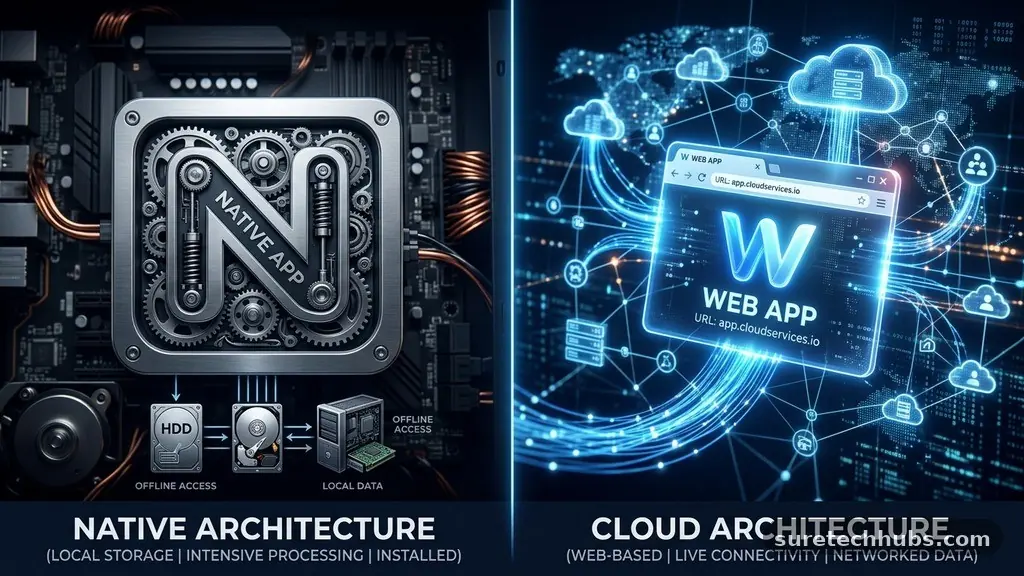
The primary distinction between these two software models lies in where the code actually executes. Desktop software is installed directly onto your operating system, whether it is Windows, macOS, or Linux.
Because the application resides on your local machine, it utilizes your computer’s CPU, RAM, and graphics card directly. This creates a tight integration with your hardware, which is why resource-heavy tasks like video rendering or complex 3D modeling often perform better on desktop programs.
Web applications, by contrast, function within your web browser. You do not need to install a heavy package of files; instead, you navigate to a URL and the application loads dynamically.
The heavy lifting—the data processing and logic—often happens on a remote server, not on your personal device. This architecture allows developers to push updates instantly to all users without requiring a manual download or installation process on every machine.
Performance and Hardware Utilization
When comparing performance, desktop applications generally hold a significant advantage for specialized tasks. Because they have direct access to your system resources, they can utilize your hardware to its full potential.
A professional editing suite installed locally can leverage your GPU for faster exports, whereas a browser-based tool is often limited by the constraints of the browser’s sandboxed environment. This is why professional creative industries still rely heavily on installed software.
Web apps offer a different kind of performance benefit, which is consistency across various devices. Because they run in the browser, the experience is largely the same whether you are on a high-end desktop, a laptop, or a tablet.
You are not dependent on having a powerful processor to run the logic, as much of the computation occurs on the cloud server. This is ideal for lightweight tasks like project management, email, or collaborative documentation.
Installation and Update Cycles
Managing software updates is a major differentiator in the desktop apps vs web apps debate. Desktop applications usually require you to download an installer, run it, and potentially restart your computer.
If you are managing software for a large team, this process becomes a significant IT burden that requires centralized deployment tools. You are responsible for ensuring that every machine in your office is running the correct version of the software.
Web applications eliminate this friction entirely. Every time you refresh the page, you are effectively running the latest version of the code that the developer has pushed to the server.
There is no need for version control or manual patching, which significantly reduces the administrative overhead for businesses. This “always-on” nature of web apps is a major reason why software-as-a-service models have become the industry standard for most modern business tools.
Data Access and Offline Capabilities
The ability to work without an active internet connection is often the deciding factor for many professionals. Desktop applications are inherently better at this because they store your files and program data locally.
If you are on a flight or working from a location with unstable connectivity, you can continue to work on your documents without interruption. Your work is then synced to the cloud once you regain an internet connection.
Web applications are traditionally reliant on a stable internet connection to function. While many modern web apps use local caching to allow for limited offline editing, they are still fundamentally designed for a connected world.
If your internet drops out, you may lose access to your features or be unable to save your progress. For a more detailed look at the evolution of these standards, you can consult the World Wide Web Consortium (W3C) standards on web applications.
Security and Privacy Considerations
Security models vary significantly between these two approaches. Desktop apps store data on your physical drive, which gives you total control over who can access your files.
However, this also means you are responsible for your own backups and cybersecurity measures. If your computer is lost or stolen, your data is at risk unless you have implemented rigorous encryption and off-site backup strategies.
Web applications shift the responsibility of security to the service provider. Large cloud providers invest heavily in enterprise-grade encryption and automated backups, which is often more secure than what an individual user could achieve on their own.
However, you are also trusting that provider with your data. You must rely on their privacy policies and security infrastructure to keep your information safe from breaches.
Comparison of Key Characteristics
To visualize how these software types compare, it is helpful to look at their core traits side-by-side. The following table highlights the operational differences that influence user experience and maintenance.
| Feature | Desktop Apps | Web Apps |
|---|---|---|
| Installation | Required | None |
| Updates | Manual/Scheduled | Automatic |
| Offline Mode | Standard | Limited/Rare |
| Hardware Access | Full | Restricted |
| Platform | OS-Specific | Browser-Based |
Development and Deployment Costs
For companies building software, the choice between these models impacts the bottom line. Developing desktop applications often requires building separate codebases for Windows, macOS, and Linux.
This increases the development time and creates higher long-term maintenance costs. You need a larger team of developers to ensure that the app runs smoothly across all target operating systems.
Web apps are generally more cost-effective because you only build one version that runs in the browser. This allows for faster deployment and a single point of maintenance for the entire user base. While building a complex web app can still be expensive, the ability to reach users on any device from a single codebase provides a much higher return on investment for most startups and modern enterprises.
Frequently Asked Questions
Are web apps less secure than desktop apps?
Not necessarily. While desktop apps keep data on your machine, web apps benefit from professional-grade security infrastructure that most individual users cannot replicate. Security usually depends on the specific provider’s practices rather than the delivery method itself.
Can I use a web app offline at all?
Many modern web apps use Progressive Web App (PWA) technology to store data locally in your browser. This allows for limited offline usage, but it is rarely as robust as a dedicated desktop application designed for offline work.
Which is better for high-performance creative work?
Desktop applications are currently the superior choice for high-performance tasks like professional video editing or 3D rendering. They offer the necessary direct access to system hardware that browsers cannot currently provide in the same way.
Does a web app always require a modern browser?
Yes, web apps rely on the features and performance of your browser to execute code. Using an outdated or unsupported browser can lead to broken features, slow performance, or complete inability to load the application.
What is the main advantage of desktop apps for business?
The main advantage is the ability to work independently of internet connectivity and the deeper integration with local system files. This makes them ideal for environments where security regulations require data to stay on local servers or where internet access is unreliable.
Conclusion
Choosing between desktop apps vs web apps depends entirely on your specific needs regarding mobility, performance, and internet reliability. If you require maximum power and the ability to work offline, desktop software remains the gold standard. If you prioritize collaboration, device flexibility, and ease of access, web applications are clearly the more efficient solution for modern workflows.
Most professionals find that a hybrid approach—using desktop tools for heavy lifting and web apps for communication and management—creates the most balanced environment. Start by identifying the most critical tasks in your day-to-day routine, and select the platform that eliminates the most friction from those processes. As technology continues to evolve, the lines between these two categories will likely blur even further, offering you even more flexibility in the future.