
Understanding how QR codes work and what happens when you scan one reveals a fascinating intersection of geometry and digital connectivity. These ubiquitous pixelated squares have moved from industrial inventory management to become a primary bridge between the physical world and our digital devices.
When you hold your phone up to a poster or a restaurant menu, you aren’t just taking a picture; you are initiating a rapid data transfer process. This article explores the technical mechanics behind the pattern and the immediate software response triggered the moment your camera lens captures those distinct black-and-white modules.
The Mechanics of a QR Code
At its core, a Quick Response code is a two-dimensional barcode designed for high-speed machine readability. Unlike a traditional linear barcode, which only holds information horizontally, this matrix stores data in both the vertical and horizontal axes. This configuration allows a single code to hold significantly more information than a series of vertical lines.
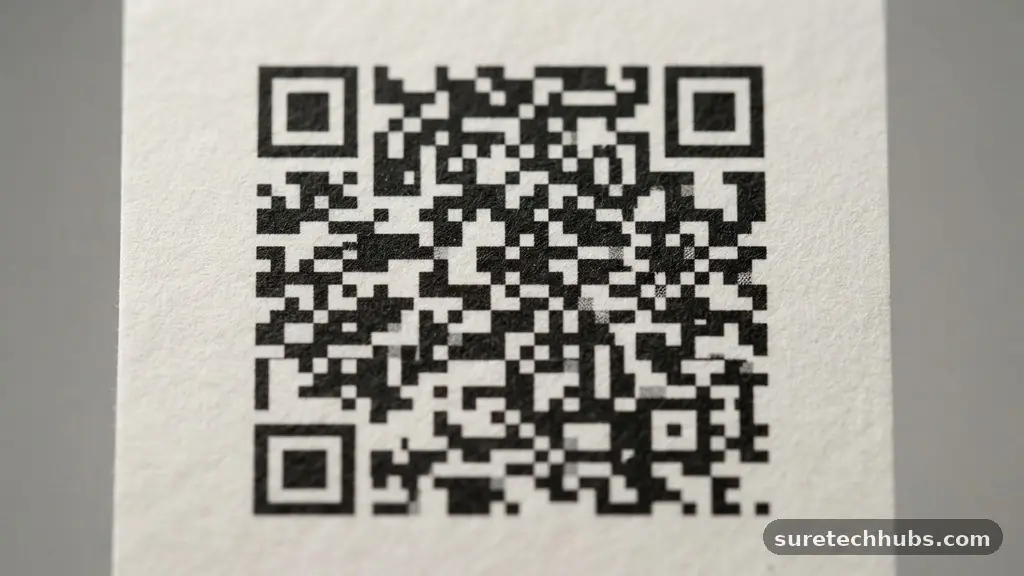
When you look closely at the pattern, you’ll notice a grid of small squares, known as modules. The distribution of these black modules against a white background creates the binary code that your device interprets as specific instructions.
The structure of the code is highly intentional, incorporating specific patterns that allow your scanner to locate and decode the image from any angle. If you look at the corners, you will see three large squares; these are the finder patterns that tell your device exactly where the code starts and ends.
Surrounding these are timing patterns, which are thin lines of alternating black and white modules that help the scanner map the grid. Even if the code is partially obscured or slightly tilted, these structural elements ensure that the international standard for QR codes remains readable under various lighting conditions.
The Scanning Process
When you point your camera at a code, your device undergoes a rapid, multi-step recognition process. First, the camera lens captures the visual data, and the software immediately identifies the finder patterns to orient the image.
Once the scanner has locked onto the orientation, it analyzes the remaining modules to determine the data density and the version of the code. The system essentially reads the dark squares as a “1” and the light squares as a “0,” effectively translating the geometric image into a string of binary digits.
This translation happens in a fraction of a second, but it involves error correction logic that is vital for usability. QR codes are designed with built-in redundancy, which means they can still be read even if up to 30% of the surface is damaged or dirty. If a section of the code is missing or obscured, the software uses the surrounding data to mathematically reconstruct the missing parts.
This explains why a scratched or partially folded code often works perfectly on the first try. It is a robust system that prioritizes speed and reliability for the end user.
Decoding the Captured Data
Once the device has successfully parsed the binary string, it decodes the information based on the specific format defined by the code. Most of the time, the data embedded in the pattern is a URL, which directs your browser to a specific website.
However, the code can also contain plain text, contact information for a digital business card, or even Wi-Fi network credentials. Your device does not simply “read” the code; it interprets the data type and launches the appropriate application to handle the result.
For example, if the code contains a VCard, your phone will recognize the format and automatically open your contacts app with the fields pre-populated. If it contains a URI, your default browser opens the site.
The beauty of this system is that it removes the need for manual typing, reducing the risk of errors while providing a direct, friction-free path to digital content. It turns a static physical object into a dynamic, interactive portal for the user.
Data Types Stored in QR Codes
While many people associate these patterns exclusively with web links, they are capable of holding several different types of information. The way the data is structured determines how your smartphone interacts with it. Below is a breakdown of the common data types you might encounter in the wild:
- URL Redirects: The most common use case, sending your browser to a landing page or product information.
- Contact Details: Encoded VCard data that allows you to save names, phone numbers, and emails to your address book.
- Wi-Fi Access: Automatically configures your device to join a specific network without requiring a manual password entry.
- Event Invitations: Adds a calendar appointment to your phone with the location, time, and description pre-filled.
- App Store Links: Directs you to a specific listing in the Google Play Store or Apple App Store for easy downloading.
Security Considerations
It is natural to wonder about the safety of scanning codes from unknown sources. Because a QR code is essentially a shortcut, it can lead you to a malicious website just as easily as a legitimate one.
When you scan a code, you are effectively clicking a link that you cannot see in its full form beforehand. Malicious actors sometimes place their own stickers over legitimate codes in public spaces to redirect users to phishing sites or websites that attempt to download malware.
To stay safe, always verify the context of the code before scanning it. If you see a code on a public poster, a parking meter, or a menu, look for signs of tampering, such as a sticker that looks placed over an existing print. If your phone prompts you to open a link, take a moment to look at the URL preview that appears before you confirm.
If the domain looks suspicious or unrecognizable, it is better to avoid it entirely. Using common sense is your primary line of defense in the digital age.
Comparison of QR Code Features
The following table highlights the differences between traditional barcodes and QR codes to help clarify why the latter has become the industry standard for mobile interaction.
| Feature | Traditional Barcode | QR Code |
|---|---|---|
| Dimension | 1D (Linear) | 2D (Matrix) |
| Data Capacity | Low (approx. 20-30 characters) | High (up to 7,089 numeric characters) |
| Scanning Direction | Horizontal only | Omnidirectional |
| Error Correction | None | Up to 30% recovery |
| Mobile Compatibility | Requires specific hardware | Built into most smartphone cameras |
Common Challenges and Solutions
Even with advanced technology, you may occasionally run into issues when trying to scan a code. Low lighting is the most common culprit, as the camera struggles to distinguish between the black modules and the white background.
If you are in a dim environment, try turning on your camera’s flash or moving to an area with better overhead lighting. Additionally, if the code is printed on a glossy or reflective surface, the glare might blind your camera lens.
Another issue is the distance or the angle at which you are holding your phone. If the code is too small or too far away, the camera cannot resolve the individual modules accurately.
Try to keep your phone steady and ensure the entire code is within the frame, rather than just the center. Most modern smartphones have software that automatically focuses and crops the image, but giving the device a clean, clear view will always lead to a faster and more reliable scan.
Frequently Asked Questions
What should I do if my phone won’t scan a QR code?
If your phone isn’t responding, first ensure your camera lens is clean. Check that your internet connection is active, as most codes require a data connection to load the linked website. If the code is damaged or blurred, try moving closer or adjusting the angle to remove any glare from the surface.
Can a QR code expire?
The code itself does not have an expiration date, but the destination it points to can be changed or deactivated by the owner. If you scan a code and get a “404 Not Found” error, it means the URL behind the code is no longer active. The physical pattern remains valid, but the digital endpoint has been removed.
Is it possible to create my own code?
Yes, creating your own is simple and free. Many websites offer generators where you can paste a URL or type a text message, and the site will instantly create the image for you. You can then download the file and print it on business cards, posters, or flyers to share information with others.
Does scanning a code cost money?
Scanning a code is free, though the website or service you are directed to might have its own costs. For example, if a code leads you to a digital store to purchase an item, the action of scanning is free, but the purchase itself is not. You should never be charged simply for the act of scanning a code.
Are there privacy risks when scanning?
The primary risk is the website you visit after scanning. When you land on a site, you are subject to that site’s privacy policy, which may include tracking your IP address or other browsing data. Avoid scanning codes from sources you do not trust or that seem out of place, such as a random sticker on a public lamp post.
Understanding how QR codes work and what happens when you scan one helps you navigate the digital landscape with more confidence. By recognizing that these codes are simply efficient carriers of information, you can better appreciate their role in connecting physical environments to online resources. While they are powerful tools for convenience, keeping a cautious eye on where a scan leads you is a smart habit to maintain.
As technology continues to evolve, the way we use these pixelated squares will likely grow even more sophisticated, offering new ways to interact with the world around us. Keep your camera ready, stay curious, and always verify the destination before you tap that link.