How to Recognize Suspicious Emails and Phishing Attempts
Learning the art of recognizing suspicious emails and phishing attempts is one of the most effective ways to protect your personal information and digital accounts. Cybercriminals frequently send deceptive messages that mimic legitimate organizations to steal passwords, financial details, or sensitive data.
By staying vigilant and understanding the common tactics scammers use, you can confidently filter your inbox and avoid falling victim to these pervasive online threats. This article explains how to identify red flags and keep your data safe.
Identifying Common Red Flags in Emails
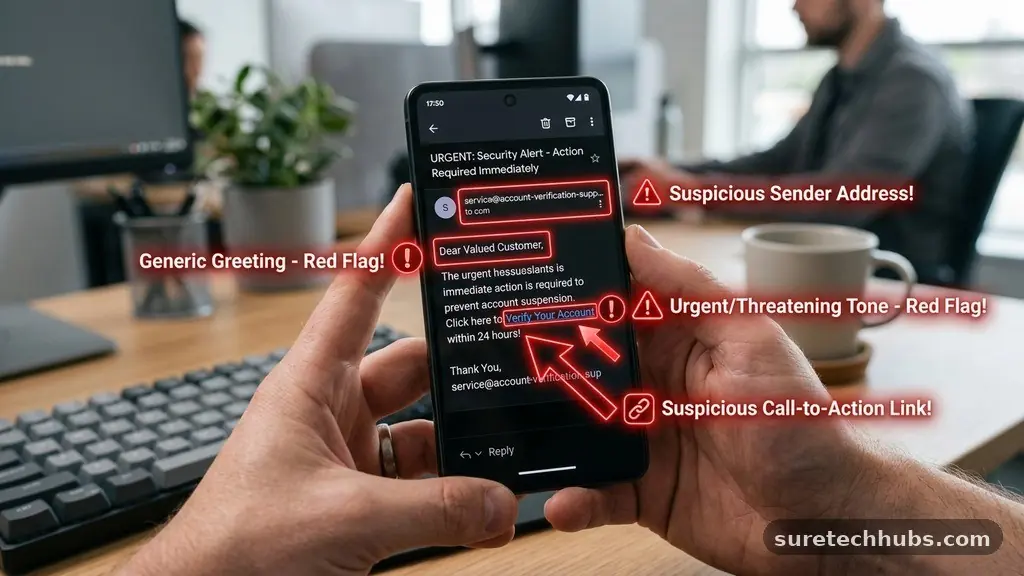
The most frequent sign of a phishing attempt is a sense of manufactured urgency. Scammers want you to act quickly without thinking, often claiming your account will be suspended or that you have won a prize that will expire within hours.
Legitimate companies rarely send emails threatening immediate account closure unless you have taken a specific action. If a message makes you feel anxious or pressured, take a deep breath and slow down.
Another major indicator is a mismatch between the sender’s display name and the actual email address. You might see a name like “Bank Support” in your inbox, but hovering your mouse over the address might reveal a string of random characters or a domain that does not match the bank’s official website.
Always check the domain after the “@” symbol carefully. Scammers often use “typosquatting,” where they register a domain that looks almost identical to a real one, such as using “g00gle.com” instead of “google.com.”
Grammar and spelling errors are also telltale signs, though attackers are becoming more sophisticated. While a major corporation has dedicated departments to proofread their communications, phishing messages are often mass-produced and may contain awkward phrasing or inconsistent fonts.
If an email looks unprofessional or contains strange formatting, treat it with extreme caution. These small visual discrepancies are often the first hint that the message is not what it claims to be.
Analyzing Links and Attachments
Links are the primary vehicle for most phishing campaigns. Attackers embed malicious URLs within buttons or text, hoping you will click them to visit a fake login page.
Before you click anything, always hover your cursor over the link to see the destination URL that appears at the bottom of your browser or email client. If the URL looks suspicious, contains strange redirects, or leads to a domain you do not recognize, do not interact with it.
Attachments are equally dangerous because they can contain malware or ransomware designed to infect your device upon opening. Be particularly wary of unsolicited files, such as invoices, shipping receipts, or legal documents that you were not expecting.
Even if the file appears to be a common format like a PDF or a Word document, it can still harbor malicious macros. If you receive an unexpected attachment from a known contact, reach out to them through a separate, trusted channel to verify if they actually sent it.
It is helpful to compare common signs of legitimate versus malicious communications. The following table provides a quick reference for identifying these differences:
| Feature | Legitimate Email | Phishing Attempt |
|---|---|---|
| Sender Address | Matches official domain exactly | Misspelled or generic domain |
| Call to Action | General notification or request | Urgent, threatening, or too good to be true |
| Links | Clear, standard destination URL | Obfuscated, shortened, or misdirected |
| Personalization | Uses your name or account details | Generic greeting like “Dear Customer” |
Protecting Your Accounts from Unauthorized Access
Securing your personal information requires more than just skepticism; it demands proactive defense strategies. One of the most important steps you can take is enabling multi-factor authentication (MFA) on all your sensitive accounts.
Even if an attacker manages to steal your password through a phishing email, they will still be unable to access your account without the second factor, such as a code sent to your mobile device or an authentication app. This simple layer of security is a powerful deterrent against most automated attacks.
You should also maintain a healthy skepticism regarding any unsolicited requests for sensitive data. No reputable organization will ever ask you to send your password, social security number, or credit card details via email.
If a company truly needs to verify your identity, they will direct you to log in through their official, secure portal. Never provide personal data in response to an email, no matter how authentic the branding may seem.
For those interested in learning more about current trends and protective measures, the Cybersecurity and Infrastructure Security Agency provides comprehensive resources for staying safe online. Regularly reviewing these official bulletins can help you stay ahead of new tactics that hackers develop. Remember that your digital hygiene—such as using unique, strong passwords and keeping software updated—is your first line of defense.
What to Do When You Spot a Phishing Attempt
If you determine that you have received a phishing email, the best course of action is to delete it immediately. There is no need to engage with the sender, as replying only confirms that your email address is active and monitored, which may lead to more spam.
By simply ignoring the message and removing it from your inbox, you effectively neutralize the threat. Most modern email providers also have a “Report Phishing” or “Report Spam” button that helps their security systems learn to block similar messages in the future.
If you are unsure whether an email is legitimate, you can take a few safe steps to verify its authenticity. Instead of clicking any links in the message, navigate directly to the company’s website by typing the address into your browser manually.
If the company has an important message for you, it will often be displayed in your account dashboard or notification center upon logging in. If you find no such notification, you can safely assume the email was an attempt to deceive you.
It is also wise to keep a list of common signs of trouble to share with family and friends. When you educate others, you help create a safer digital environment for everyone. Here are a few key actions to take when you encounter a suspicious message:
- Do not click any links or download any attachments from the message.
- Check the sender’s email address for subtle misspellings or odd domains.
- Report the message to your email provider using their built-in reporting tools.
- Contact the company directly through their official support phone number if you are worried about your account status.
- Delete the email once it has been reported to prevent accidental interaction later.
Understanding the Psychology of Scams
Phishing is not just a technical challenge; it is a psychological one. Attackers are experts at exploiting human emotions like fear, greed, and curiosity.
They know that if they can make you panic about a tax bill or get excited about a fake refund, you are much more likely to bypass your usual critical thinking. Recognizing this emotional manipulation is a key part of staying safe.
Many phishing emails are designed to look like they come from a person in authority, such as a CEO or a government official. By using a tone of command, they hope you will comply without questioning the source. Always pause when you feel a strong emotional reaction to an email.
Ask yourself if the request makes sense in the context of your relationship with that sender. If a CEO is suddenly emailing you to buy gift cards, it is almost certainly a scam.
Consistency is another tactic used by sophisticated attackers. They may send a series of emails that seem to build a narrative, making the final request feel like the logical next step.
Never assume that because you have received multiple emails from a “service,” that the service is legitimate. Always verify the source independently, regardless of how many messages you have received.
Recognizing Advanced Phishing Tactics
As technology evolves, so does the sophistication of phishing campaigns. Attackers are now using more than just basic email messages; they are increasingly utilizing “spear phishing,” which is a targeted attack against a specific individual or organization.
These emails are highly personalized, often using information found on social media sites like LinkedIn or Facebook to make the message sound incredibly convincing. If an email references your recent job change or a local event you attended, do not automatically trust it.
Another advanced tactic involves the use of QR codes in emails, often called “quishing.” By asking you to scan a code with your phone, attackers can bypass the security filters that scan traditional links.
Once you scan the code, your phone may be directed to a malicious site that is not protected by your desktop’s security software. Never scan a QR code from an unsolicited email, as it is a modern method to lead you into a trap.
Finally, be aware of “man-in-the-middle” phishing, where attackers intercept legitimate communication chains. By gaining access to an existing email thread, they can insert themselves into the conversation and send a fraudulent message that appears to be part of a real business deal.
Always be suspicious of sudden changes in payment instructions, such as a request to wire money to a new bank account. Always verify such changes via a phone call to a known, trusted contact.
Frequently Asked Questions
Can I get phished just by opening an email?
In most cases, simply opening an email is safe, provided you do not click any links or download attachments. However, some advanced emails contain “tracking pixels” that notify the sender when you have opened the message, confirming that your account is active. While this does not give them access to your device, it can lead to an increase in future spam.
Is it better to delete or report phishing emails?
It is best to do both, but reporting is more helpful for the broader community. Reporting the email to your provider helps them update their filters to block the sender’s domain and patterns for other users. After you have used the reporting tool, deleting the message ensures you do not accidentally click on it later.
How can I tell if an email is a phishing attempt if it looks perfect?
Even if the branding and logos look perfect, look at the technical headers and the sender’s actual address. Check if the email was sent to you specifically or if it was part of a large list. If the message asks you to perform an action that you would normally do through a dedicated app or portal, it is likely a phishing attempt.
What should I do if I accidentally clicked a phishing link?
If you clicked a link but did not enter any information, disconnect your device from the internet immediately and run a full security scan. If you entered your password or financial details, change your password immediately on a different, secure device. You should also contact your bank or the relevant service provider to let them know your account may be compromised.
Staying Safe in Your Digital Life
Recognizing suspicious emails and phishing attempts is a skill that pays off every time you open your inbox. By focusing on the sender’s address, the urgency of the message, and the destination of any links, you can avoid becoming a statistic.
Remember that you are the final filter for your personal data. Taking those few extra seconds to verify a request is always worth the peace of mind it provides.
Keep your software updated and use unique passwords for every account to ensure that even if one service is compromised, your other data remains secure. If you ever feel unsure, trust your gut and verify the information through an independent, official channel.
By staying alert and informed, you can enjoy the benefits of the digital world while keeping your personal information private and secure. Stay vigilant and continue to prioritize your online security every day.